
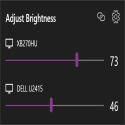
Twinkle Tray lets you easily manage the brightness levels of multiple monitors.
This app adds a new icon to your system tray that you can click to instantly access the brightness levels of all compatible monitors. These brightness sliders can adjust one or all of the screens at once.
Twinkle Tray offers a variety of options and features to suit your preferences. All are 100% free.
It integrates seamlessly with Windows 10 and Windows 11.
Works with most laptops and DDC/CI enabled monitors.
Bind hotkeys to adjust the brightness of specific or all screens.
Check DDC/CI features such as contrast, volume and power status.
Supports brightness settings by time of day or idle.
Supports command line arguments for custom scripting.
Normalize the backlight on different monitors.
Localized for more than 20 languages.
It starts with Windows.
Twinkle Tray 1.16.0 Download
Xander FrangosTotal downloaded program :1 Tools Different
Tags: , multi-monitor brightness settings, Editor's rating out of 5 stars (5) So what do you think?


