
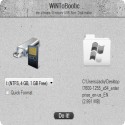
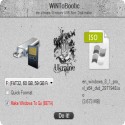
WinToBootic is a free application that can help you to create bootable Windows hard disk or USB flash drive. You can use a CD/DVD, Folder or ISO image to create your bootable disk.
This is a portable application that you can start using as soon as you extract it from the ZIP archive. Using WinToBootic is as easy as selecting your USB drive and then formatting it to make it bootable.
Of course, you need to add the CD/DVD, Folder, or ISO with with bootable Windows files using either file browser or ?drag and drop? feature. You may also use WinToBootic to create a ?Windows To Go? disk if you are using Windows 8. You can create the disk with a Non-Enterprise Windows Install ISO on a Non-Certified USB disk
WinToBootic 2.2.1 Download
WiNToBooticTotal downloaded program :378 Tools Different
Tags: , Setting up a flash memory system, windows iso boot, usb boot boot, WinToBootic download, Editor's rating out of 5 stars (5) So what do you think?


