

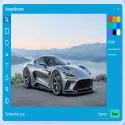
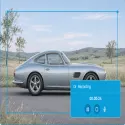
ScreenShooteris a free desktop tool developed for Windows computers that combines quick screenshot capture, built-in image editing, and screen recording with audio for up to 5 hours into a single interface. After installation, it allows you to instantly capture using keyboard shortcuts without navigating through complex menus and to save your files locally or to cloud storage services.
Key Features:Flexible Screenshot Capture: You can instantly capture the entire screen, an active application window, or a specific area selected with the mouse using customizable shortcut keys.
Built-in Image Editor: With the editing window that opens as soon as you take a screenshot, you can add arrows, text notes, brush drawings, filled shapes, and step numbering to the image; blur sensitive information, crop, and use the color picker.
Up to 5 Hours of Screen Recording with Audio: You can record up to 5 hours of uninterrupted screen video at once by selecting the computer system audio and microphone audio simultaneously or separately.
Automatic Cloud Upload and Easy Sharing: You can copy captured images directly to the clipboard or save them by reducing the file size without any loss of quality; you can also automatically upload videos to Google Drive, OneDrive, Yandex Disk, or FTP servers.
Multilingual Support: Supports a total of 12 different interface languages, including English, German, French, Spanish, and Russian
ScreenShooter 2.8.5.1859 Download
ScreenShooterTotal downloaded program :0 Tools Different
Tags: , free screenshot software, windows screen recorder, screen recording software with audio, screenshot editing tool, Editor's rating out of 5 stars (5) So what do you think?


