
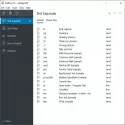

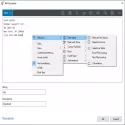
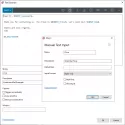

FastKeys allows you to create hotkeys that trigger certain commands using the keyboard and mouse. The shortcut mechanism is based on scripts from the reputable AutoHotkey program. FastKeys also has a built-in text expander that lets you enter selected phrases, such as text apps or email, obtained by simply entering a few defined letters.
It is possible to define actions very broadly for the start menu, shortcuts and text expander. Thanks to these functions, you can manage the system, run and run programs, it is also possible to send e-mails, adjust audio and video settings, enter text. The application also allows you to run commands or scripts. There are more than 500 ready-made switches to regulate the behavior of the selected option. The program also offers a built-in text editor with which you can create macros and scripts.
FastKeys is also great for computer games. It has scripts that support popular games like Diablo 3, Skyrim, Call of Duty, World of Warcraft, League of Legends, Minecraft. The program allows, for example, to define new function keys, automate clicks, move automatically, shoot, crouch and jump, shoot continuously and increase accuracy.
The graphical interface does not contain fireworks, but is comfortable and transparent. To open the app's start menu, simply move the mouse cursor to the top of the screen, you can also set this function on the right. All this will be especially useful for Windows 8 users. The program has a large number of options, but a fairly clear management scheme facilitates automation and makes FastKeys user-friendly.
FastKeys 5.09 Download
FEEDBACKTotal downloaded program :2 Desktop Different
Tags: , shortcut and automatic command program, Editor's rating out of 5 stars (5) So what do you think?


