
Okul Zil Programı
bell program for schools

Features
1. To be able to schedule weekday and weekend classes
2. Ability to schedule each day separately
Add and select unlimited melodies (you can use any melody in mp3 format that you copy to the sounds/melodies folder as a ringtone)
3. Assign a separate melody for each schedule
4. Broadcast music during recess (all the music in mp3 format that you copied to the sounds/muzikyayayini folder will play in a random order during recess. You need to select the Recess Music Stream box in the Menu - General Settings window and press the save settings button).
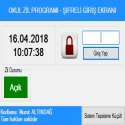
5. Ability to set a password for the entrance
6. Add to Windows startup (The School Bell Program will open automatically when the computer is turned on. In the Menu - General Settings window, you need to select the Add to Windows startup box and press the save button. You need to temporarily disable the antivirus system before saving. The reason is that some antivirus programs may see it as a virus because it makes an entry in the registry).
7. Send to system tray
8. Ability to temporarily disable the bell for events
9. Ability to play the National Anthem, Respect and Siren from within the program
10. Set a computer shutdown time
Note: Users of the old version will not have to redo the lesson scheduling when they replace the appfiles/lesson times folder with the folder in the new version.
Okul Zil Programı v5.5 Download
Murat ALTINDAĞTotal downloaded program :23 Desktop Different
Tags: , bell program for schools, Editor's rating out of 5 stars (5) So what do you think?

Natura Sound Therapy
gezgin natura sound therapy 3
AutoSizer
gezgin natura sound therapy 3
Mapkeyboard
Mapkeyboard download
Right Click Enhancer
Right Click Enhancer download