
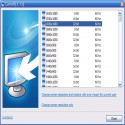
Set for every user a different screen resolution. After login, the screen resolution will be changed to the stored setting.
After running the setup, Carroll is started automatically for every user.
At first start, Carroll shows all available screen resolutions. Select
the desired screen resolution and click ‘Change screen resolution and
restore with every logon’.
Next time, Carroll changes the screen resolution automatically without displaying the user interface.
Carroll 1.31 Download
The SZTotal downloaded program :57 Desktop Different
Tags: , different resolution by user, different screen size according to the user, Editor's rating out of 5 stars (5) So what do you think?


