
Sonic Visualiser
Audio analysis and visualization program
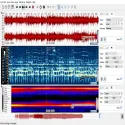
If editing audio files isn't enough, and you want to see the wavelengths, frequencies, and spectrogram of the sound in minute detail, then Sonic Visualiser is the professional solution you're looking for.
Developed by Queen Mary University of London, this free and open-source software has become an industry standard in audio analysis and visualization.
In this article, you can find answers to questions such as what is Sonic Visualizer, what does it do, and what are its features, and you can safely download the latest version to your computer.
What is Sonic Visualizer?
Sonic Visualiser is an advanced audio analysis program designed to visually examine the content of audio recordings. Unlike standard audio editing programs (such as Audacity), Sonic Visualiser primarily focuses on visualizing, analyzing, and annotating the aesthetic or technical components of audio.
It's ideal for musicologists, sound archivists, forensic audio experts, and software developers interested in signal processing.
What are its key features?
Advanced Spectrogram View: Analyze the frequency components of sound, along with their changes over time, in a clear and colorful format.
Vamp Plugin Support: You can integrate hundreds of Vamp plugins into the system for automatic analysis such as pitch, tempo, rhythm, and note detection.
Layering: Perform simultaneous analysis by adding different analysis layers (waveform, spectrogram, timestamps) to the same audio file.
Slow Down Listening: Reduce playback speed without sacrificing quality to avoid missing details in the audio.
Wide Format Support: Directly supports WAV, MP3, OGG, FLAC, and many other audio formats frequently used in AI analytics.
How to use Sonic Visualizer?
The program's interface is quite flexible. After importing an audio file, you can create a frequency map of the sound by right-clicking or selecting "Pane -> Add Spectrogram" from the top menu. If you want to perform rhythm or note analysis, you can install Vamp plugins, which are also recommended on the official website, to your computer and perform automatic measurements.
Chris CannamTotal downloaded program :0 Audio Tools Organizer
Tags: Audio analysis and visualization program, Sonic Visualiser download, sound editing program,

