
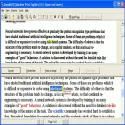
If you have dozens of pages of printed text to type and the typing process will take a long time, we recommend trying SimpleOCR.
This program allows you to save time by scanning printed pages and transferring them to your computer as text.
OCR is a general term used for this type of software and is an abbreviation of the words Optical Character Recognition.
Features: Scan to text using a printer; Convert image files to text from a loaded file; Convert to text by entering a web address; Multiple conversion capabilities; Printer selection; Bold, underlined, and italic text; Zoom in and out; Save converted text as txt and doc files; Show unreadable characters and letters in a different color; Make corrections within the text; Add/delete pages; Adjust scan quality; Adjust page width/height; Set default save type; Set default save directory; Change text warning appearance (font, color, thickness, italics, etc.); Save imported images as tif files; Create different profiles; Convert the entire page to text or only the selected section.
SimpleOCR 7 Download
Meta Enterprises, LLCTotal downloaded program :58 Tools File operation
Tags: , OCR program, Editor's rating out of 5 stars (4) So what do you think?


