

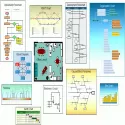
RFFlow is an ideal program for creating a wide variety of flowcharts, organizational charts and diagrams for education, business and industry.
Drawing and editing graphs is easy with RFFlow. Just drag a shape from the template onto your chart. Shapes in RFFlow are automatically sized around your text. Right-click a shape or line to edit its properties. RFFlow contains more than 1600 shapes neatly arranged into templates designed for specific tasks. Stencils are arranged in an expandable list that allows you to quickly find the pattern or shape you want. Each shape has a tooltip showing its name or description. RFFlow, control objects, brackets, cause-effect (fishbone) diagrams, computer / network design, CPM charts, crime investigation diagrams, data flow diagrams, database definitions, electrical / electronics, entity relationship diagrams, flowchart (basic flow chart, DIN66001 ). , physical flowchart), fluid power design, gantt charts, genetic lineage charts, Graham process flow, Greek alphabet, IDEF0, IDEF1X, industrial objects, office layouts, organization charts, pert charts, quality system / ISO 9000 charts, SDL charts, software design (UML, Booch, Gane / Sarson, Shlaer-Mellor OOA, Yourdan and others), building charts, timelines, transport objects and WBS charts. You can use RFFlow stencils or create your own custom stencils with just the shapes and lines you need. You can import bitmaps and thumbnail images from files or Clipboard and add them to a custom stencil. You can also draw your own custom shapes in RFFlow and add them to a stencil. The text is entered and formatted just like in your word processor. RFFlow is an OLE server where you can easily copy and paste your graphics into Word or other Windows applications. You can embed or link your chart. RFFlow allows you to save your graphics in GIF, JPEG and HTML formats for use on Web sites. Technical support is free and unlimited.
RFFlow 5.06.5.0 Download
RFF ElectronicsTotal downloaded program :3 Graphic Multimedia Picture editör
Tags: , flowchart drawing program, Editor's rating out of 5 stars (5) So what do you think?

