
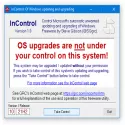
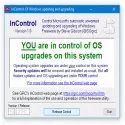
InControl lets you easily control Windows 10 and 11. You can block or allow Windows updates without your permission by checking them.
From Windows 10 21H1 to Windows 10 21H2, you can "Version Control" first to allow these two fields to be edited. Then change “21H1” to “21H2” and press “Take Control”.
Windows Update will now target feature version 21H2 and make it available for installation when it becomes available. And if you do nothing else, your system will stay there until you consciously relinquish control. Note that InControl will keep your Windows where it is even after the current version and feature release is out of support.
You will see a complaint about the current version of Windows that needs an update. However, your system will not be updated while in InControl. If you are playing with InControl and want to restore the Version and Release fields to their natural (current) default values, delete the contents of these fields when the system is not under control, then click “Take Control” and they will be set to the current system version and feature version. That is all. Like all of GRC's ultra-light free utilities, no installation or setup is required. Just run the utility with administrator rights. The operation of InControl is scriptable from the command line and provides all the technical details about the Registry keys it modifies.
InControl 1.0 Download
Gibson ResearchTotal downloaded program :51 Tools System Tools
Tags: , checking windows updates, , Editor's rating out of 5 stars (3) So what do you think?


