

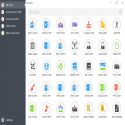
In the hustle and bustle of daily work or student life, working with PDF files can sometimes turn into a real ordeal. Have you ever spent hours searching for a program to convert a PDF file to Word, reduce its size, or merge two different documents? That's where PDF Candy comes in, a lifesaver software that brings all these complex processes together under one roof.
Developed by IceCream Apps, this successful tool makes PDF management more practical than ever before with its simple interface and rich features.
What is PDF Candy and what is it used for?
PDF Candy is a versatile platform offering over 40 tools in one dashboard, allowing you to edit, convert, compress PDFs, and much more. You can use it online through your web browser or as a desktop program (Windows) without an internet connection.
The program's greatest advantage is its user-friendly interface. Instead of complex menus or settings requiring professional knowledge, you simply select the operation you want to perform and drag and drop your file.
Key Features
Advanced Format Conversion: Instantly convert your PDF files to Word, Excel, JPG, PNG, or EPUB formats. Similarly, easily convert files in these formats to PDF.
OCR (Optical Character Recognition) Support: Detects text in scanned documents or images and converts them into editable text files.
Document Editing and Merging: You can rotate pages, crop, combine multiple PDFs into a single document, or split large files into parts.
Security and Watermarking: You can add passwords to your documents, remove existing passwords, or place custom watermarks to protect your copyrights.
Batch Processing Support (Desktop Version): You can process multiple files simultaneously to save time.
Advantages and Disadvantages of PDF Candy
Like any software, PDF Candy has its strengths and weaknesses. Here's what you need to know before downloading the program:
Advantages:
Extensive Tool Range: Everything from compression and OCR to encryption and conversion is available.
Zero Complexity: Cleanly designed icons make it easy for even beginners to use.
Desktop Freedom: The PC version lets you edit your files even without an internet connection.
Disadvantages:
Free Version Restriction: The free version on the web only allows you to perform one transaction per hour. For heavy usage, you need to upgrade to a premium plan.
Lack of Advanced Professional Tools: It lacks some of the high-end design/print settings offered by massive and very expensive premium software like Adobe Acrobat.
Frequently Asked Questions (FAQ)
1. Is PDF Candy safe?
Yes, PDF Candy is completely safe and has passed virus scans. Files you upload in the online version are permanently deleted from the servers shortly after the process is complete.
2. Can I convert scanned (photo) PDFs to text format?
Yes, thanks to the OCR (Optical Character Recognition) feature included in the program, you can convert the text in scanned documents into readable and editable text.
3. Which operating systems does PDF Candy support?
The web version can be used via a browser on all devices (Mac, Windows, Linux, Mobile). The desktop program is fully compatible with Windows 7, 8, 10, and Windows 11 operating systems.
Icecream PDF Candy 3.19 Download
Icecream AppsTotal downloaded program :4 Tools File operation
Tags: PDF Candy download, , editing pdf files, Editor's rating out of 5 stars (5) So what do you think?

