

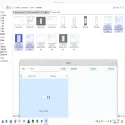
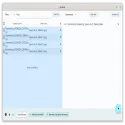
If you want to rename a large number of files (such as music archives, photos, TV/movie episodes, or documents) on your computer or phone, this is a very practical, modern, and lightweight tool.
Key Features and Capabilities
Chaining and Reordering Rules: To modify file names, you can chain multiple rules together (such as append, remove, replace, number, reorder, and abbreviate) and change their order (working from top to bottom).
Preview: Before applying changes, you can instantly compare the old and new versions of the file names.
Metadata and Tag Support: You can add tags such as artist, album, song title, and track number from audio files (MP3, etc.) to file names, including file sizes, dates, EXIF information from photos, or other details.
Advanced Numbering: You can assign sequential numbers to files with configurable starting number, increment step, zero padding, prefix, and suffix options.
Character and Language Conversions: Functions such as case conversion, Simplified/Traditional Chinese conversion, Chinese to Pinyin translation, and conversion of supported Cyrillic alphabets to Latin characters can be performed.
External Spreadsheet Support (CSV/TSV): If you want to edit file names in a spreadsheet program, you can export the existing list as CSV/TSV (after editing the new_name column) and then re-import it for bulk renaming.
Saving Rules with YAML: You can save the custom rules you create in YAML format for later reuse.
Flut Renamer 1.6.3 Download
sun-jiaoTotal downloaded program :0 Tools File operation
Tags: , change batch filename, Editor's rating out of 5 stars (5) So what do you think?

