
Flagfox
Flagfox download
When we say showing the location of the site you are visiting, I feel we need to elaborate a bit. Every site we see on the internet is physically located on a computer, thanks to the main server, also known as a server provider.
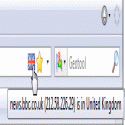
Of course, these computers are protected and organized by companies and centers called Data Centers so that they can provide us with services. The Flagfox extension's job is to show us the locations of these computers. While showing their locations, it also adds a few small details, sometimes useful, like a cookie. For example; DNS IP Address: This shows the static IP address of the main computer where the website is located, its country, state and/or province. DNS Info (Server IP Information): This feature, which is the main function of the extension, shows the country, province, and IP address of the server hosting the site currently open in your Firefox browser. Whois Information (Registered under whose name): This service opens a page where you can find out who the website you are visiting is registered under, how many sites the publishing company hosts, and much more information. GeoTool (Geographic Map): By showing the IP address on a map, it offers the feature of being able to find the server address on the map. NOTE: The reliability of the address information you will find with this feature; This will depend on whether the Data Center management provided the correct IP addresses when registering them; we recommend you consider this possibility. Wikipedia: This feature allows you to learn about the country where the server of the site you are visiting is located by opening its Wikipedia page. Copy IP: This feature allows you to copy the server address of the website you are visiting to your computer's memory with a single click. For example: When you open http://www.wikipedia.org with your Firefox internet browser, if you hover your mouse cursor over the flag in the lower right corner of your Firefox browser (it's there during the initial setup), you will see a yellow Windows information bubble warning that Wikipedia's site is hosted in the Netherlands. (I just learned this myself :D) Version Compatibility: It works flawlessly with all Firefox versions between 1.5 and 3.0b2. Installing Firefox Add-ons: When you click the download link, click the yellow warning bar that appears under your browser's menu and select "Allow this site." This will open the Firefox Add-on Installation window. Once the countdown timer on the "Install" button is up, click the button to install. After installing Firefox add-ons, it is recommended to restart Firefox. This warning will appear after each add-on installation. Removing and Updating Firefox Add-ons: In the Add-ons window that opens under the Tools menu in your browser's top menus, find the add-on you want to remove, right-click on it and select "Uninstall," or click once and then click the "Uninstall" button at the bottom of the window. Alternatively, you can update all add-ons in the window using the "Update" button. After removing or updating Firefox add-ons, it is recommended to restart Firefox. This warning will also appear on the add-ons screen. Privacy Policy: The FlagFox Privacy and Usage Guarantee text, published on Mozilla.org and guaranteed by Mozilla, is presented below in Turkish. You can read the original text (in English) by clicking here. After installing this add-on to your internet browser, no information from your computer will be sent to third parties or elsewhere over the internet. The add-on operates the following services: IP Address Location Service: This service is provided by retrieving data from databases of pre-selected sites trusted by many websites on the internet. Site Name Lookup Service: This service is obtained by selecting the server where the most frequently used DNS cache (DNS records) are stored. If you are working on a proxy network, this feature may not work, but you can change this feature in Flagfox settings. Flagfox processes external web services first through standard redirects on its own site when you click on the add-on at the bottom of your browser, and then queries databases of designated service providers. When providing this service, Flagfox only sends the IP address, server name, and/or country name of the site the user clicked on to obtain user information. This information is not stored on Flagfox servers in any way and may not be used again for various purposes in the future.
Flagfox 6.1.95 Download
FlagfoxTotal downloaded program :92 internet Browser
Tags: Flagfox download, , , Editor's rating out of 5 stars (4) So what do you think?

Google Chrome
Fast Internet Browser
İnternet Explorer
Fast Internet Browser
SlimBrowser Türkçe Yama
Fast Internet Browser
Adblock Plus extension yandex
yandex ad blocking