
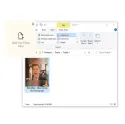
DropPoint is an open-source desktop productivity tool that simplifies file copying, moving, and drag-and-drop operations across operating systems.
When working on a computer with two windows or multiple folders, moving files from one place to another can reduce screen space and require constantly switching windows. DropPoint acts as a digital "temporary file rack/clipboard" that simplifies this process.
What is it used for and what are its main features?
Floating Shelf:
To move or copy files/folders, first drag them into the small DropPoint window located in the corner of the screen.
Then, you open the target folder, email, or application in full screen, drag the files from the DropPoint shelf, and drop them where they belong. This eliminates the need to align windows side-by-side.
Multiple Workspace and Virtual Desktop Support:
It makes moving files much easier when switching between different desktop windows (Virtual Desktops/Workspaces) or full-screen applications.
Keyboard Quick Access (Shortcut Support):
It runs silently in the background (System Tray).
You can instantly open a new DropPoint window at your cursor's location by pressing the keyboard shortcuts (Shift + Caps Lock or Shift + Tab on macOS) whenever you need it.
Cross-Platform & Modern Design:
It works on Windows, macOS, and Linux systems.
Windows 11 features a sleek and eye-pleasing minimalist interface, in line with Fluent Design principles.
Open Source and Free:
It's completely free, ad-free, and its development processes are carried out as open source via GitHub.
Drop Point 1.2.1 Download
GameGodS3Total downloaded program :0 Tools File operation
Tags: , advanced file copy program, Editor's rating out of 5 stars (5) So what do you think?

