

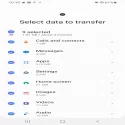

Smart Switch; gives you the freedom to move your contacts, music, photos, calendar, text messages, device settings and more to your new Galaxy device. Also, Smart Switch? helps you find your favorite apps or Google Play? recommends similar applications in
Who can transfer?
Android owners
- Wireless transfers between Galaxy devices: Android 4.0 or higher
- Transfers from a compatible Android device to a Galaxy device: Android 4.0 or higher (Note that non-Samsung devices with an Android version below 6.0 can only connect to Galaxy devices that support Mobile AP.)
- Wired transfer: Android 4.3 or higher, charging cable and USB OTG cable
iOS owners, transfer using the best option for you:
- Wired transfer from your iOS device to your Galaxy: iOS 5.0 or higher, iOS device cable (lightning or 30 pin) and USB OTG cable
- Import from iCloud: iOS 4.2.1 or later and Apple ID
- iTunes? PC/Mac transfer using: Smart Switch PC/Mac software ? Get started http://www.samsung.com/smartswitch
Windows Phone owners
- Wireless transfers: Windows OS 10
* Note: For more information and step-by-step instructions, go to http://www.samsung.com/smartswitch
What can be transferred?
- Contacts, calendar(Device content only), messages, photos, music (only DRM-protected content, not supported for iCloud), videos (only DRM-protected content), call logs, notes, alarms, Wi-Fi settings, wallpapers, documents, App data (Galaxy devices only) and homepage layouts (Galaxy devices only)
- You can send app data and home screen layouts by upgrading your Galaxy device to M OS (Galaxy S6 or higher).
Smart Switch Mobile 3.7.60.1 Download
Samsung Electronics Co., Ltd.Total downloaded program :2 mobil android -Tools
Tags: , transfer data from samsung galaxy to android, Editor's rating out of 5 stars (5) So what do you think?


