

Google Family Link is a parental controls app that helps keep your family safe online. Every family's relationship with technology is different. That's why we've developed tools to help you find the right balance and develop healthy digital habits. With the app, you can see your child's device usage and location, and manage their privacy settings.
With Family Link:
You can establish digital basic rules.
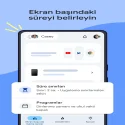
• Screen time limits: You can set limits on how long your child can spend in front of a screen. With Family Link, you can schedule school time and rest time on your child's device and set daily time limits.
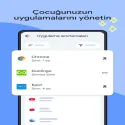
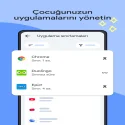
• Manage apps: You can give your child flexibility in app usage. You can set specific time limits for apps, or disable time limits for educational or regularly used apps. You can also block apps.
You can manage content filters, security, and privacy settings.
• Manage the content your child can access online: You can set up parental controls for Google services like Chrome, Play, YouTube, and Search. Family Link allows you to block inappropriate sites, require approval for new apps, and manage permissions for apps and websites.
• Secure your child's account: Family Link allows you to access your child's account and data settings. As a parent, you can help your child change or reset their password, edit their personal information, and delete their account if necessary.*
*Children of the appropriate age can manage their own accounts.
You can stay connected while on the road.
• See their location: With the Family Link app, you can track your child's location on a single map if they have their device with them.
• Receive notifications and alerts: Family Link will notify you of important events such as your child arriving at or leaving a location. You can also make the device ring and see the remaining battery life.
Google Family Link 2.66.0.2025w47.833755031 Download
Google LLCTotal downloaded program :1 mobil android -Securty
Tags: , safe internet application, Editor's rating out of 5 stars (5) So what do you think?


